瓦阵
球在空台子上弹得再欢也不是游戏。该铺瓦了——8 列 × 7 行,整整五十六片,第 1 章那张表说好的数。
Health:那一列终于兑现
第 1 章的表给砖块留了一列 Health,当时它只是示意。现在它是一个真组件:
/// 瓦的耐久:还经得起几下。第 1 章那张表的 Health 列,在此兑现
#[derive(Component)]
struct Health(u8);
Listing 20-4(其一):Health——瓦的耐久(examples/listing-20-04.rs)
注意瓦没有专门的 Brick 标记组件。在这个游戏里,“瓦”的身份就是“有耐久的碰撞体”——Health 这一列本身就定义了它。第 1 章那张表没骗你:砖块行恰好就是 Transform + Sprite + Health(外加一张碰撞登记证)。
瓦阵的几何照旧常量先行,配色分两档:
// 瓦阵:8 列 × 7 行 = 56 片——第 1 章那张表说好的数
const BRICK_COLUMNS: usize = 8;
const BRICK_ROWS: usize = 7;
const BRICK_SIZE: Vec2 = Vec2::new(92.0, 26.0);
const BRICK_GAP: f32 = 8.0;
const BRICK_TOP_Y: f32 = 212.0; // 最上一行瓦的中心高度
const GLAZED_ROWS: usize = 2; // 顶上两行是筒瓦:带釉,要砸两下const TILE_COLOR: Color = Color::srgb(0.52, 0.62, 0.66); // 素瓦的灰青
const GLAZED_COLOR: Color = Color::srgb(0.27, 0.43, 0.56); // 筒瓦的釉色Listing 20-4(其二):瓦阵常量——8 × 7 = 56,顶上两行带釉
铺瓦
生成是一个双层循环,唯一要动笔算的是第一片瓦的圆心在哪。整阵宽度 = 列数 × (瓦宽 + 缝) − 最后多算的一条缝;左移半个阵宽、再右移半片瓦宽,就是第 0 列的中心——Bevy 的 translation 指的是中心点而不是左上角(第 12 章),网格计算都得带着这半片的修正:
// 瓦阵:算出左上角第一片的圆心,按行列铺开
    let grid_width = BRICK_COLUMNS as f32 * (BRICK_SIZE.x + BRICK_GAP) - BRICK_GAP;
    let first_x = -grid_width / 2.0 + BRICK_SIZE.x / 2.0;
    for row in 0..BRICK_ROWS {
        let glazed = row < GLAZED_ROWS; // 自上而下数,前两行带釉
        for column in 0..BRICK_COLUMNS {
            commands.spawn((
                Health(if glazed { 2 } else { 1 }),
                Sprite::from_color(if glazed { GLAZED_COLOR } else { TILE_COLOR }, BRICK_SIZE),
                Transform::from_xyz(
                    first_x + column as f32 * (BRICK_SIZE.x + BRICK_GAP),
                    BRICK_TOP_Y - row as f32 * (BRICK_SIZE.y + BRICK_GAP),
                    0.0,
                ),
                Collider { size: BRICK_SIZE },
            ));
        }
    }
Listing 20-4(其三):铺瓦——行号定耐久与配色,列号定位置
自上而下数,前 GLAZED_ROWS 行是筒瓦:2 点耐久、釉色更深。五十六个实体一个循环出齐——第 3 章 Commands 排队生成的日常。
碎瓦
碰撞系统的盒子查询多带一项 Option<(&mut Sprite, &mut Health)>(第 4 章的可选查询组合):墙和凳没有 Health,拿到 None,只反弹;瓦拿到 Some,先反弹,再扣耐久:
/// 反弹照旧;撞上的若是瓦(带 Health),扣它一条耐久
fn check_collisions(
    mut commands: Commands,
    ball: Single<(&Transform, &mut Velocity), With<Ball>>,
    mut colliders: Query<(
        Entity,
        &Transform,
        &Collider,
        Option<(&mut Sprite, &mut Health)>,
    )>,
) {
    let (ball_transform, mut velocity) = ball.into_inner();
    let bounding = BoundingCircle::new(ball_transform.translation.truncate(), BALL_RADIUS);

    for (entity, transform, collider, brick) in &mut colliders {
        let target = Aabb2d::new(transform.translation.truncate(), collider.size / 2.0);
        let Some(side) = hit_side(bounding, target) else {
            continue;
        };
        let (reflect_x, reflect_y) = match side {
            Side::Left => (velocity.x > 0.0, false),
            Side::Right => (velocity.x < 0.0, false),
            Side::Top => (false, velocity.y < 0.0),
            Side::Bottom => (false, velocity.y > 0.0),
        };
        if reflect_x {
            velocity.x = -velocity.x;
        }
        if reflect_y {
            velocity.y = -velocity.y;
        }

        // 墙和凳没有 Health,这个分支只有瓦才进得来
        if let Some((mut sprite, mut health)) = brick {
            health.0 -= 1;
            if health.0 == 0 {
                commands.entity(entity).despawn(); // 瓦碎
            } else {
                sprite.color = TILE_COLOR; // 釉面剥落,露出素瓦
            }
        }
    }
}
Listing 20-4(其四):碰撞的瓦分支——扣到零就 despawn,没扣完就掉釉
Option<(A, B)> 这个写法要求两个组件都在才给 Some——墙上有 Sprite 没 Health,照样走 None 分支,正合适。掉釉的表现很直接:把 sprite.color 改成素瓦色——筒瓦挨第一下,釉面剥落、颜色变浅,玩家一眼读懂“这片还要再来一下”。碎瓦则是 commands.entity(entity).despawn(),第 3 章的延迟语义在这里是安全网:despawn 排队到同步点统一落地,本拍内这片瓦还能继续参与判定,不会出现“循环到一半实体消失”的尴尬。
运行:
cargo run -p ch20-breakout --example listing-20-04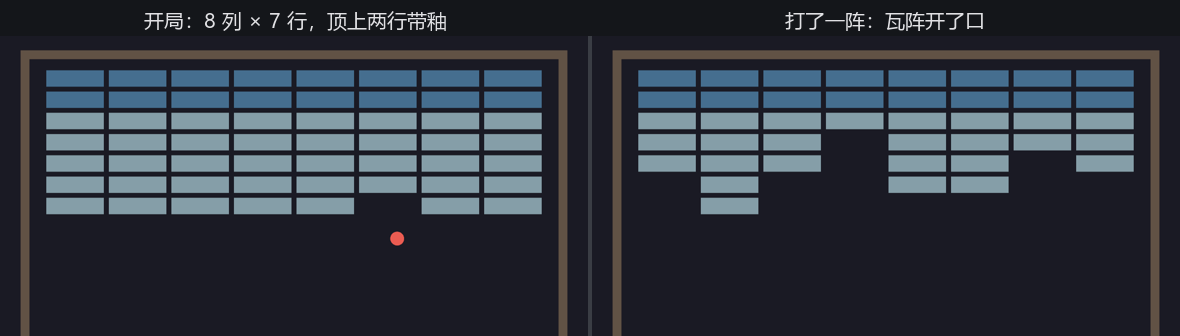
Figure 20-5:瓦阵——开局满铺,打一阵就开口子
绣球撞上瓦阵,“砸瓦”这个游戏成立了:球弹上去,瓦应声而碎,缺口越打越大;运气好打到顶排,还能看见筒瓦掉釉变色、第二下才碎。但它还是一台哑巴游戏——砸了多少片?没人记。砸碎的那一声脆响?没有。砸完了会怎样?什么也不会发生。下一节先把账记上。